Spring
Spring
SpringMvc
SSM+SpringBoot
SpringBoot框架
Spring
Spring
Spring框架IOC和DI
略
容器配置类和组件扫描
<?xml version="1.0" encoding="UTF-8"?>
<beans xmlns="http://www.springframework.org/schema/beans"
       xmlns:context="http://www.springframework.org/schema/context"
       xmlns:tx="http://www.springframework.org/schema/tx"
       xmlns:xsi="http://www.w3.org/2001/XMLSchema-instance"
       xsi:schemaLocation="http://www.springframework.org/schema/beans
       http://www.springframework.org/schema/beans/spring-beans.xsd
 http://www.springframework.org/schema/tx
        http://www.springframework.org/schema/tx/spring-tx.xsd
         http://www.springframework.org/schema/context
        http://www.springframework.org/schema/context/spring-context.xsd">

    <context:component-scan base-package="com.bkbk"></context:component-scan>


    <!--    <mvc:resources mapping="/img/**" location="/img/"></mvc:resources>-->
    <!--    <mvc:resources mapping="/**" location="/"></mvc:resources>-->

    <bean id="dataSource" class="com.alibaba.druid.pool.DruidDataSource">
        <property name="driverClassName" value="com.mysql.cj.jdbc.Driver"></property>
        <property name="url" value="jdbc:mysql://localhost:3306/school"></property>
        <property name="username" value="root"></property>
        <property name="password" value="root"></property>
    </bean>

    <bean  id="sessionFactory" class="org.mybatis.spring.SqlSessionFactoryBean">
        <property name="dataSource" ref="dataSource"></property>
        <property name="configLocation"  value="classpath:mybatis.xml"></property>
    </bean>

    <bean class="org.mybatis.spring.mapper.MapperScannerConfigurer">
        <property name="sqlSessionFactoryBeanName" value="sessionFactory"></property>
        <property name="basePackage" value="com.bkbk.mapper"></property>
    </bean>


    <bean id="transactionManager" class="org.springframework.jdbc.support.JdbcTransactionManager">
        <property name="dataSource" ref="dataSource"></property>
    </bean>

    <tx:annotation-driven></tx:annotation-driven>

</beans>
自动装配
@Autowired
自动注入的意思,标注在属性上也可以标注在方法上标注在属性上, spring的ioc使用的是反射暴力破解
ioc容器会按类型去匹配,匹配到一个正常注入,匹配不到或者匹配到多个报错配合@Qualifier注解可以实现按名字注入
@Resource
按名字注入,如果你给了名字按照你给的名字去找,没给名就用被标注的属性名字,如果名字找不到就会按类型去匹配
注解开发
@Target(value = {ElementType.FIELD,ElementType.TYPE})//这个注解可以使用在哪
@Retention(value = RetentionPolicy.RUNTIME)// 注解保留到什么时间
public @interface Table {
  string value() default "asdfg";
  string[] name();
}
AOP处理日志记录
Spring默认使用jdk动态代理,自由式需要AspectJ依赖
jdk动态代理:
public interface Eat {
    abstract  void eat();
}

public class Person implements Eat {
    @Override
    public void eat() {
      System.out.println("person eating!");
    }
}

public class MyProxy<T> implements InvocationHandler {

    private T target;

    public MyProxy(T target){
        this.target = target;
    }

    @Override
    public Object invoke(Object proxy, Method method, Object[] args) throws Throwable {
        System.out.println("aaa");
        method.invoke(target,args);
        System.out.println("aaabbb");
        return  null;
    }
}

public class test {
    public static void main(String[] args) {

        Person person = new Person();
        MyProxy proxy = new MyProxy<Eat>(person);


        //创建代理对象,代理对象的每个执行方法都会替换执行Invocation中的invoke方法
        Eat x = (Eat) Proxy.newProxyInstance(Eat.class.getClassLoader(),new Class<?>[]{Eat.class}, proxy);

        x.eat();

        //也可以使用下面的方式创建代理类对象,Proxy.newProxyInstance其实就是对下面代码的封装
        /*try {
            //使用Proxy类的getProxyClass静态方法生成一个动态代理类renterProxy
            Class<?> renterProxyClass = Proxy.getProxyClass(Person.class.getClassLoader(), new Class<?>[]{Person.class});
            //获取代理类renterProxy的构造器,参数为InvocationHandler
            Constructor<?> constructor = renterProxyClass.getConstructor(InvocationHandler.class);
            //使用构造器创建一个代理类实例对象
            Person renterProxy = (Person)constructor.newInstance(renterHandler);
            renterProxy.rentHouse();
            //
        } catch (Exception e) {
            e.printStackTrace();
        }*/
    }
}
xml配置aop
<?xml version="1.0" encoding="UTF-8"?>
<beans xmlns="http://www.springframework.org/schema/beans"
       xmlns:context="http://www.springframework.org/schema/context"
       xmlns:aop="http://www.springframework.org/schema/aop"
       xmlns:xsi="http://www.w3.org/2001/XMLSchema-instance"
       xsi:schemaLocation="http://www.springframework.org/schema/beans
       http://www.springframework.org/schema/beans/spring-beans.xsd
         http://www.springframework.org/schema/aop
        http://www.springframework.org/schema/aop/spring-aop.xsd
         http://www.springframework.org/schema/context
        http://www.springframework.org/schema/context/spring-context.xsd">

    <context:component-scan base-package="com.bkbk.demo"></context:component-scan>

    <aop:config>
        <aop:pointcut id="x" expression="execution(* com.bkbk..*.*(..))"/>
        <aop:aspect ref="log">
            <aop:before method="log" pointcut-ref="x"></aop:before>
        </aop:aspect>
    </aop:config>
</beans>
@Component
public class Log {
    public void log(){
        System.out.println(" a  log ");
    }
}

public interface A {
    void a();

    void b();
}

@Service
public class StudentService implements A{
    @Override
    public void a() {
        System.out.println("aaaa");
    }

    @Override
    public void b() {
        System.out.println("bbbb");
    }
}

public class Test {
    public static void main(String[] args) {
        ApplicationContext applicationContext = new ClassPathXmlApplicationContext("app.xml");

        A a =(A) applicationContext.getBean("studentService");
        a.a();
    }
}

output:
 a  log
aaaa
Spring事务处理
配置后使用 @Transactional
<?xml version="1.0" encoding="UTF-8"?>
<beans
       xmlns:tx="http://www.springframework.org/schema/tx"
       xsi:schemaLocation="
       http://www.springframework.org/schema/tx
        http://www.springframework.org/schema/tx/spring-tx.xsd >
    <tx:annotation-driven></tx:annotation-driven>
</beans>
SpringMvc
Spring整合MyBatis
 <bean  id="sessionFactory" class="org.mybatis.spring.SqlSessionFactoryBean">
        <property name="dataSource" ref="dataSource"></property>
        <property name="configLocation"  value="classpath:mybatis.xml"></property>
    </bean>

    <bean class="org.mybatis.spring.mapper.MapperScannerConfigurer">
        <property name="sqlSessionFactoryBeanName" value="sessionFactory"></property>
        <property name="basePackage" value="com.bkbk.mapper"></property>
    </bean>
请求参数绑定
基本功能 在java servlet Api包中HttpServletRequest参数处理
jdk低版本时使用@RequestParam指定对应名以及默认值
post请求参数乱码处理
<filter>
    <filter-name>characterEncodingFilter</filter-name>
    <filter-class>org.springframework.web.filter.CharacterEncodingFilter</filter-class>
    <init-param>
      <param-name>encoding</param-name>
      <param-value>UTF-8</param-value>
    </init-param>
    <init-param>
      <param-name>forceRequestEncoding</param-name>
      <param-value>true</param-value>
    </init-param>
    <init-param>
      <param-name>forceResponseEncoding</param-name>
      <param-value>true</param-value>
    </init-param>
  </filter>
  <filter-mapping>
    <filter-name>characterEncodingFilter</filter-name>
    <url-pattern>/*</url-pattern>
  </filter-mapping>
日期类型参数的转换
class DateConvert:
public class DateConvert implements Converter<String, Date> {

    @Override
    public Date convert(String source) {
        SimpleDateFormat simpleDateFormat = new SimpleDateFormat("yyyy-MM-dd");
        Date date = null;
        try {
            date =simpleDateFormat.parse(source);
        } catch (ParseException e) {
            throw new RuntimeException(e);
        }
        return date;
    }
}
mvc.xml
<!--    声明转换器-->
    <mvc:annotation-driven  conversion-service="ConversionService"></mvc:annotation-driven>

    <bean id="ConversionService" class="org.springframework.context.support.ConversionServiceFactoryBean">
        <property name="converters">
            <list>
                <bean class="com.bkbk.config.DateConvert"/>
            </list>
        </property>
    </bean>
test: http://localhost:8888/test/date?date=2023-06-02
 @GetMapping("/date")
    public void show13(Date date){
        System.out.println(date);
    }
result:
Fri Jun 02 00:00:00 CST 2023
json语法
响应数据为json
有很多成熟的类库
gson
jackson: spring默认支持的
fastjson
@ResponseBody 表示返回值转换为json返回
@RestController == @Controller + @ResponseBody
同时需要
<mvc:annotation-driven></mvc:annotation-driven>
访问静态资源的配置
访问webapp下静态资源
<mvc:resources mapping="/img/**" location="/img/"></mvc:resources>
在html中发起Ajax请求并处理响应的json数据
ajax.html
<!DOCTYPE html>
<html lang="en">
<head>
    <meta charset="UTF-8">
    <title>yctf</title>
</head>
<body>
    <button type="button" onclick="er()">hehe</button>
</body>
<script>


    function er(){
        const xhr = new XMLHttpRequest();
        xhr.open("get","/day3_springmvc_war/json");
        xhr.onreadystatechange = function (){
            if(xhr.readyState ==4 ){

                console.log(xhr.response)
                for(let i = 1 ;i <10;i++){
                    const image = document.createElement('img')
                    image.src  = '/day3_springmvc_war/img/3.jpg'
                    image.width=80
                    image.height=80
                    document.body.appendChild(image)
                }

            }
        }
        xhr.send();
    }
</script>
</html>
SSM+SpringBoot
SSM项目搭建
文件结构:
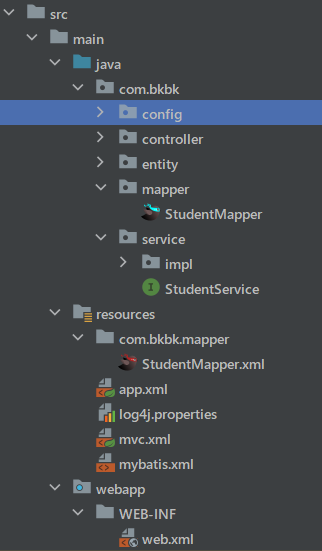
依赖:
 <dependency>
      <groupId>org.mybatis</groupId>
      <artifactId>mybatis</artifactId>
      <version>3.5.6</version>
    </dependency>

    <dependency>
      <groupId>org.mybatis</groupId>
      <artifactId>mybatis-spring</artifactId>
      <version>2.0.6</version>
    </dependency>
    <!-- https://mvnrepository.com/artifact/commons-fileupload/commons-fileupload -->
    <dependency>
      <groupId>commons-fileupload</groupId>
      <artifactId>commons-fileupload</artifactId>
      <version>1.5</version>
    </dependency>

    <dependency>
      <groupId>org.springframework</groupId>
      <artifactId>spring-webmvc</artifactId>
      <version>5.3.25</version>
    </dependency>

    <dependency>
      <groupId>org.springframework</groupId>
      <artifactId>spring-jdbc</artifactId>
      <version>5.3.25</version>
    </dependency>

    <!-- https://mvnrepository.com/artifact/javax.servlet/javax.servlet-api -->
    <dependency>
      <groupId>javax.servlet</groupId>
      <artifactId>javax.servlet-api</artifactId>
      <version>3.1.0</version>
      <scope>provided</scope>
    </dependency>

    <dependency>
      <groupId>com.alibaba</groupId>
      <artifactId>druid</artifactId>
      <version>1.2.15</version>
    </dependency>

    <!-- https://mvnrepository.com/artifact/log4j/log4j -->
    <dependency>
      <groupId>log4j</groupId>
      <artifactId>log4j</artifactId>
      <version>1.2.17</version>
    </dependency>

    <dependency>
      <groupId>com.fasterxml.jackson.core</groupId>
      <artifactId>jackson-databind</artifactId>
      <version>2.15.0</version>
    </dependency>


    <dependency>
      <groupId>mysql</groupId>
      <artifactId>mysql-connector-java</artifactId>
      <version>8.0.28</version>
    </dependency>
web.xml
<?xml version="1.0" encoding="UTF-8"?>
<web-app xmlns="http://xmlns.jcp.org/xml/ns/javaee"
         xmlns:xsi="http://www.w3.org/2001/XMLSchema-instance"
         xsi:schemaLocation="http://xmlns.jcp.org/xml/ns/javaee
                  http://xmlns.jcp.org/xml/ns/javaee/web-app_4_0.xsd"
         version="4.0">

  <context-param>
    <param-name>contextConfigLocation</param-name>
    <param-value>classpath:app.xml</param-value>
  </context-param>

  <listener>
    <listener-class>org.springframework.web.context.ContextLoaderListener</listener-class>
  </listener>

  <servlet>
    <servlet-name>mvc</servlet-name>
    <servlet-class>org.springframework.web.servlet.DispatcherServlet</servlet-class>
    <init-param>
      <param-name>contextConfigLocation</param-name>
      <param-value>classpath:mvc.xml</param-value>
    </init-param>
    <load-on-startup>1</load-on-startup>
  </servlet>
  <servlet-mapping>
    <servlet-name>mvc</servlet-name>
    <url-pattern>/</url-pattern>
  </servlet-mapping>

  <filter>
    <filter-name>characterEncodingFilter</filter-name>
    <filter-class>org.springframework.web.filter.CharacterEncodingFilter</filter-class>
    <init-param>
      <param-name>encoding</param-name>
      <param-value>UTF-8</param-value>
    </init-param>
    <init-param>
      <param-name>forceRequestEncoding</param-name>
      <param-value>true</param-value>
    </init-param>
    <init-param>
      <param-name>forceResponseEncoding</param-name>
      <param-value>true</param-value>
    </init-param>
  </filter>
  <filter-mapping>
    <filter-name>characterEncodingFilter</filter-name>
    <url-pattern>/*</url-pattern>
  </filter-mapping>

</web-app>
mvc.xml
<?xml version="1.0" encoding="UTF-8"?>
<beans xmlns="http://www.springframework.org/schema/beans"
       xmlns:context="http://www.springframework.org/schema/context"
       xmlns:mvc="http://www.springframework.org/schema/mvc"
       xmlns:xsi="http://www.w3.org/2001/XMLSchema-instance"
       xsi:schemaLocation="http://www.springframework.org/schema/beans
       http://www.springframework.org/schema/beans/spring-beans.xsd
       http://www.springframework.org/schema/mvc
        http://www.springframework.org/schema/mvc/spring-mvc.xsd
         http://www.springframework.org/schema/context
        http://www.springframework.org/schema/context/spring-context.xsd">

    <context:component-scan base-package="com.bkbk.controller"></context:component-scan>


    <mvc:annotation-driven></mvc:annotation-driven>

    <bean id="multipartResolver" class="org.springframework.web.multipart.commons.CommonsMultipartResolver"></bean>

<!--    <mvc:resources mapping="/img/**" location="/img/"></mvc:resources>-->
<!--    <mvc:resources mapping="/**" location="/"></mvc:resources>-->

</beans>
app.xml 事务管理、数据库连接池
<?xml version="1.0" encoding="UTF-8"?>
<beans xmlns="http://www.springframework.org/schema/beans"
       xmlns:context="http://www.springframework.org/schema/context"
       xmlns:tx="http://www.springframework.org/schema/tx"
       xmlns:xsi="http://www.w3.org/2001/XMLSchema-instance"
       xsi:schemaLocation="http://www.springframework.org/schema/beans
       http://www.springframework.org/schema/beans/spring-beans.xsd
 http://www.springframework.org/schema/tx
        http://www.springframework.org/schema/tx/spring-tx.xsd
         http://www.springframework.org/schema/context
        http://www.springframework.org/schema/context/spring-context.xsd">

    <context:component-scan base-package="com.bkbk"></context:component-scan>


    <!--    <mvc:resources mapping="/img/**" location="/img/"></mvc:resources>-->
    <!--    <mvc:resources mapping="/**" location="/"></mvc:resources>-->

    <bean id="dataSource" class="com.alibaba.druid.pool.DruidDataSource">
        <property name="driverClassName" value="com.mysql.cj.jdbc.Driver"></property>
        <property name="url" value="jdbc:mysql://localhost:3306/school"></property>
        <property name="username" value="root"></property>
        <property name="password" value="root"></property>
    </bean>

    <bean  id="sessionFactory" class="org.mybatis.spring.SqlSessionFactoryBean">
        <property name="dataSource" ref="dataSource"></property>
        <property name="configLocation"  value="classpath:mybatis.xml"></property>
    </bean>

    <bean class="org.mybatis.spring.mapper.MapperScannerConfigurer">
        <property name="sqlSessionFactoryBeanName" value="sessionFactory"></property>
        <property name="basePackage" value="com.bkbk.mapper"></property>
    </bean>


    <bean id="transactionManager" class="org.springframework.jdbc.support.JdbcTransactionManager">
        <property name="dataSource" ref="dataSource"></property>
    </bean>

    <tx:annotation-driven></tx:annotation-driven>

</beans>
mybatis.xml
<?xml version="1.0" encoding="UTF-8" ?>
<!DOCTYPE configuration
        PUBLIC "-//mybatis.org//DTD Config 3.0//EN"
        "http://mybatis.org/dtd/mybatis-3-config.dtd">
<configuration>

     <settings>
         <setting name="logImpl" value="LOG4J"/>
     </settings>
</configuration>
StudentMapper.xml 示例
<?xml version="1.0" encoding="UTF-8" ?>
<!DOCTYPE mapper
        PUBLIC "-//mybatis.org//DTD Mapper 3.0//EN"
        "https://mybatis.org/dtd/mybatis-3-mapper.dtd">
<mapper namespace="com.bkbk.mapper.StudentMapper">

    <resultMap id="stuResultMap" type="com.bkbk.entity.Student">
        <result property="name" column="stu_name"/>
        <result property="age" column="stu_age"/>
        <result property="id" column="stu_id"/>
        <result property="desc" column="stu_desc"/>
    </resultMap>

    <select id="findAll" resultMap="stuResultMap">
        select * from stu;
    </select>

</mapper>
SpringMVC文件上传
    @PostMapping("/multi")
    public String testupload(MultipartFile file){
        System.out.println(file);
        return "yctf";
    }
SpringBoot介绍
SpringBoot项目创建的几种方式
1.官网构建工具
2.idea对官网构建工具的集成
3.自己构建
SpringBoot优点
集成父项目,父项目里面对市面上常用的框架进行了版本声明,避免了版本不兼容的问题内置tomcat服务器,省的自己配置服务器
Spring和SpringMVC需要配置的那些东西SpringBoot都配置好了,可以直接用提供了很多功能,这些功能我们自己搭建ssm也能实现
SpringBoot配置文件详解
SpringBoot配置文件
配置文件名字必须叫application,必须放根目录下后缀有properties和yml
SpringBoot多环境配置
application.yml
spring:
  profiles:
    active: dev
application-dev.yml
spring:
  datasource:
    driver-class-name: com.mysql.cj.jdbc.Driver
    url: jdbc:mysql://localhost:3306/school?serverTimezone=GMT%2B8&characterEncoding=utf8&useSSL=true
    username: root
    password: root # 你的数据库密码
SpringBoot框架
SpringBoot统一异常处理
@ControllerAdvice
public class GlobalExceptionHandle {
    @ExceptionHandler(ArithmeticException.class)
    @ResponseBody
    public Map<String,Object> runtimeHandler() {
        Map<String, Object> map = new HashMap<>();
        map.put( "code",1);
        map.put( "msg","服务器很忙");
        return map;
    }
}
SpringBoot整合MyBatis
设置console级别:
logging:
  level:
    root: warn
    com.bkbk.school.mapper: trace
  pattern:
    console: '%p%m%n'
SpringBoot文件上传
文件上传本身是SpringMVC的功能,SpringBoot已经配置好了
    @PostMapping(" /singleUpload ")
    public ResultVo singleUpload(MultipartFile file) throws IOException {
        System.out.println(file);
        //存储到本机
        file.transferTo(new File("E:\\") );
        return ResultVo.success();
    }
1.存本机上+静态服务器(nginx)
优点:磁盘读写、存储速度快
缺点:文件的在本机上,访问一定会占用这台机器的网速
2.存另外一台电脑上+静t态服务器(nginx)
优点:I文件访问不占用业务服务器的网速
缺点:网络传输慢
SpringBoot拦截器
WebMvcConfig
 @Configuration
public class WebMvcConfig  implements WebMvcConfigurer {

     @Autowired
     private StudentInterceptor studentInterceptor;
     @Override
     public void addInterceptors(InterceptorRegistry registry) {
         registry.addInterceptor(studentInterceptor).addPathPatterns("/student/**");
     }
 }
interceptor
@Component
public class StudentInterceptor implements HandlerInterceptor {
    @Override
    public boolean preHandle(HttpServletRequest request, HttpServletResponse response, Object handler) throws Exception {
        System.out.println("do interceptor");
        return true;
    }
}
效果:
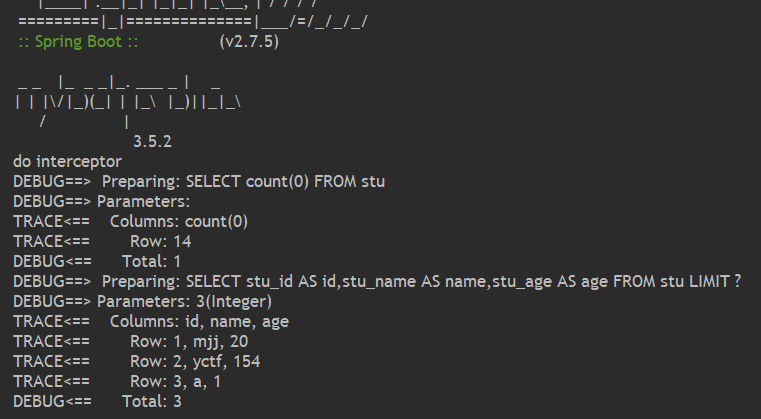
RESTFul开发
Restful是一个资源定位及资源操作的风格。不是标准也不是协议,只是一种风格。基于这个风格设计的软件可以更简洁,更有层次,更易于实现缓存等机制。
功能
资源:互联网所有的事物都可以被抽象为资源
资源操作:使用POST、DELETE、PUT、GET,使用不同方法对资源进行操作。
分别对应 添加、 删除、修改、查询
传统方式操作资源:通过不同的参数来实现不同的效果!方法单一,post 和 get。
http://127.0.0.1/item/queryItem.action?id=1 查询,GET
http://127.0.0.1/item/saveItem.action 新增,POST
http://127.0.0.1/item/updateItem.action 更新,POST
http://127.0.0.1/item/deleteItem.action?id=1 删除,GET
使用RESTful操作资源 : 可以通过不同的请求方式来实现不同的效果!如下:请求地址一样,但是功能可以不同!
http://127.0.0.1/item/1 查询,GET
http://127.0.0.1/item 新增,POST
http://127.0.0.1/item 更新,PUT
http://127.0.0.1/item/1 删除,DELETE
在Spring MVC中可以使用 @PathVariable 注解,让方法参数的值对应绑定到一个URI模板变量上。
@Controller
public class RestFulController {
    //映射访问路径
    @RequestMapping("/commit/{p1}/{p2}")
    public String index(@PathVariable int p1, @PathVariable int p2, Model model){
        int result=p1+p2;
        //Sprin MVC 会自动实力化一个Model对象用于向视图中传值
        model.addAttribute("msg","结果:"+result);
        //返回视图位置
        return  "test1";
    }
}